


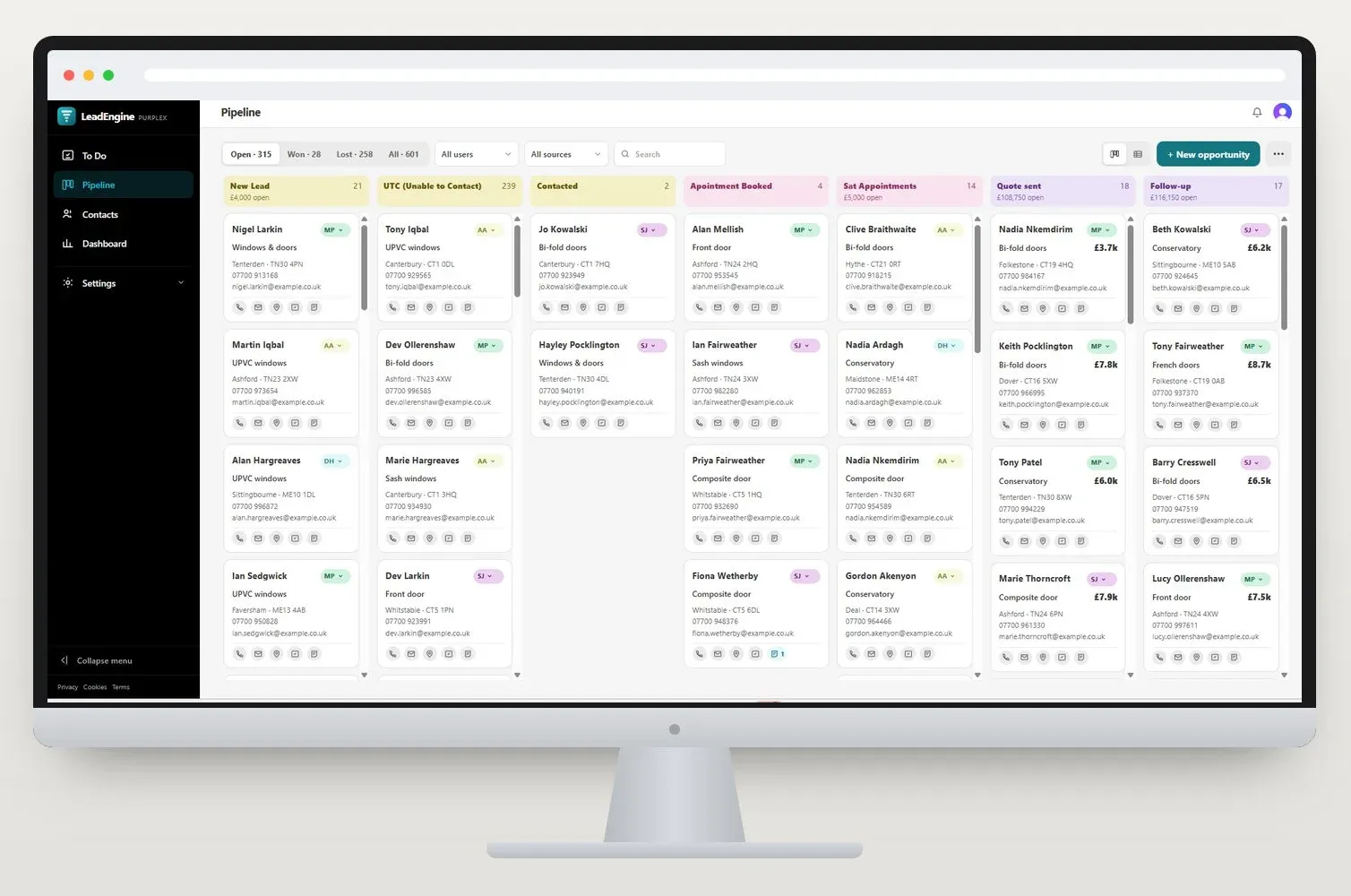
What LeadEngine does
- Enquiries and their recorded source
- Your own sales stages, owners and next steps
- Appointments, quotes and outcomes in one place
- Won work shown against the campaigns that started it
What you get
One view of every open enquiry, who owns it and what happened to it.
Follow one enquiry through LeadEngine
Click through the stages to see what your team records at each step, from the first enquiry to a won job. The source stays attached the whole way, so a cheap enquiry and a profitable one don’t look the same in your reports.
Follow an enquiry
The source stays with the job as your team moves it forward.
Kanban Board or List, whichever suits you
See every enquiry as cards on a board, grouped by stage, and drag a job along as it moves from first call to survey, quote and won. Or switch to a list to search, sort and filter by date, salesperson or product. Same leads, same detail, viewed whichever way your team works.
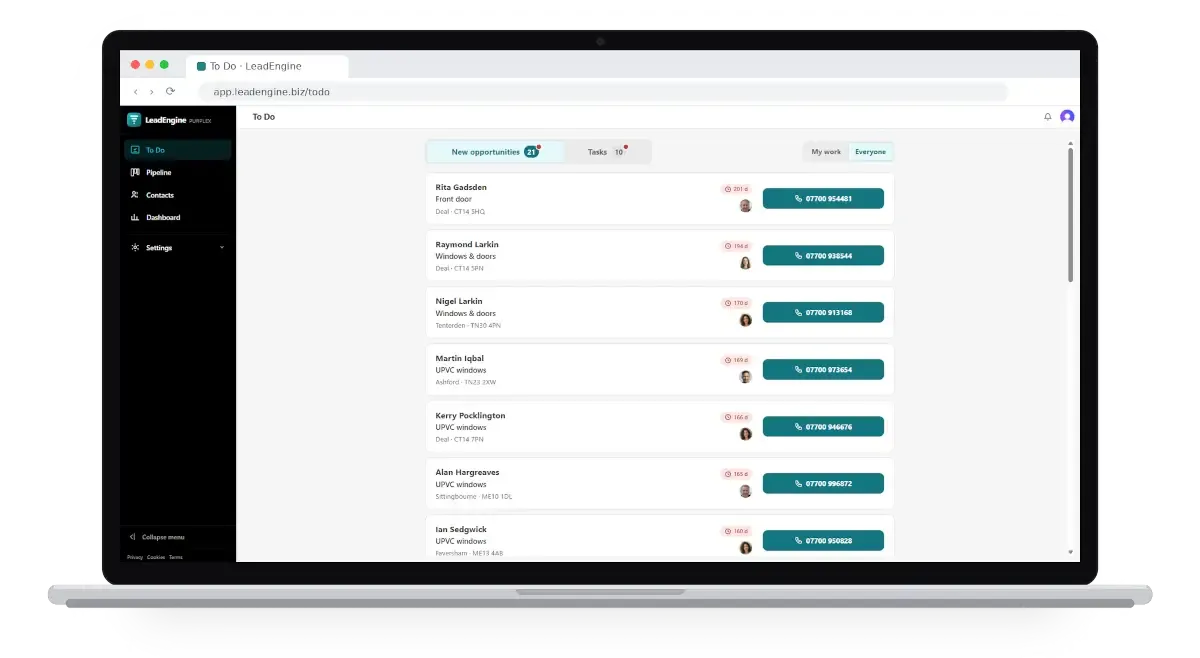
Know who to call next
Your To Do list puts every new enquiry and follow-up task in one place, with the oldest first and a timer showing how long each one has waited. Switch between new opportunities and tasks, or between your own work and the whole team’s, then tap the number to call.
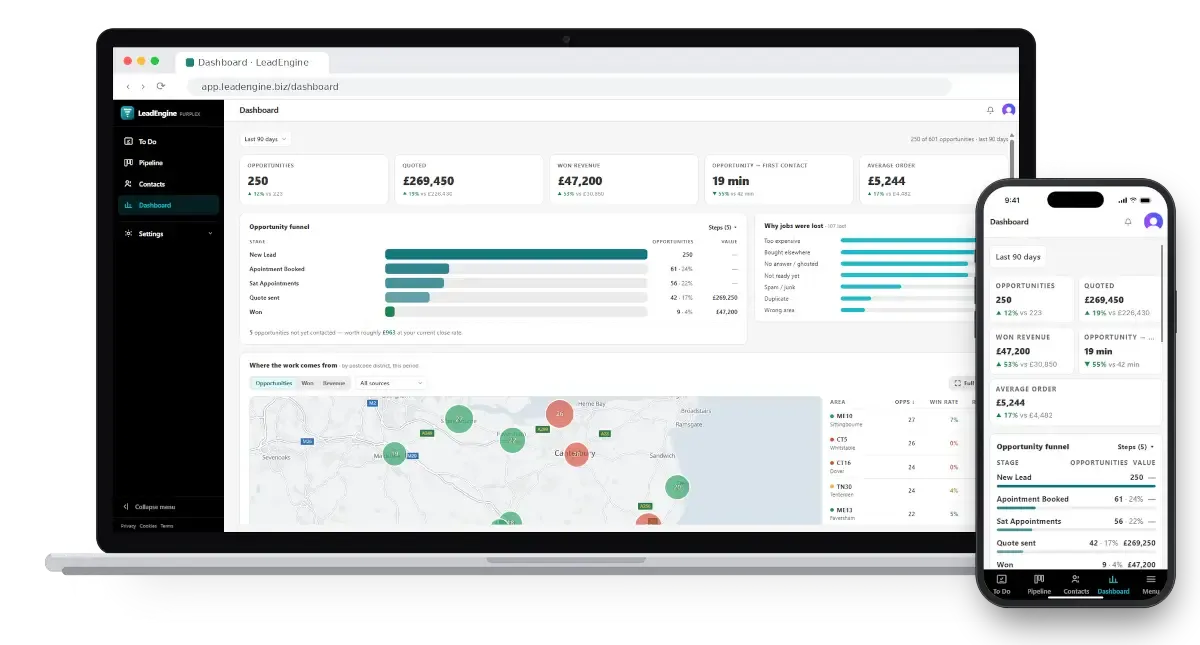
See how your sales are doing at a glance
See how many enquiries came in, how many you’ve quoted and how much work you’ve won, all on one screen. Track how quickly your team gets back to new leads and how long jobs take to go from initial enquiry to quote to signed order, so you can spot what’s holding things up and see who’s closing the most work.
LeadEngine or Salestracker 4?
Both organise sales. LeadEngine is for the homeowner enquiries your website brings in. Salestracker is for finding and selling to other businesses.
Is LeadEngine right for your business?
- Free for Purplex clientsYour account manager arranges access and setup.
- Every enquiry in one pipelineSee what needs chasing, who owns it and what happens next.
- Know which marketing brings in workThe recorded source stays with each enquiry through to won or lost.
- Your stages, your teamSet your own sales stages, owners and time limits, so stalled enquiries stand out.
- Who it’s for
- Teams that receive homeowner enquiries and follow them through to a sale.
- Setup
- We agree how enquiries reach it, your pipeline stages, users, reporting and access.
- Good to know
- Your account manager arranges access. Website connections and any extra work are agreed during setup.
Before you set it up
- Your website
- Tell us which platform your website runs on and how enquiries arrive now. We’ll confirm it works with LeadEngine before setup starts.
- Your team
- Bring your sales stages, the people who’ll use it and the forms that receive your enquiries. We configure it with you.
- Ads and reporting
- Tell us which advertising and reporting connections you need, and we’ll confirm which are supported.
- Your data
- Access, export, retention and who can use your account are agreed during setup.
- Not a Purplex client?
- Talk to us. We’ll confirm whether LeadEngine is available to you and whether there’s a cost.
Arrange your free LeadEngine CRM
Tell us how enquiries reach you today and who follows them up. Your account manager will confirm access and setup.
Free for Purplex clients. Your account manager arranges access.
Related tools
All tools Windows
 Doors
 Conservatory roof
SmartStep Forms
Picture-led enquiry forms that find out the project, the priority and the timing before asking for contact details.
Source Tracker
Records the campaign behind each website enquiry and passes it into LeadEngine or your inbox.
Need something built around your own products?
If none of these fit, we can design and build a tool for your business as a bespoke project, scoped and costed with you before work starts.
Where a bespoke project helps
- A product that’s hard to explain online
- Information your team types in twice
- A handover that keeps going wrong